This is the first thing you see when you open TutorPing. Think of it as your morning briefing — what's happening today, who needs attention, and how your practice has been doing over the past couple months.
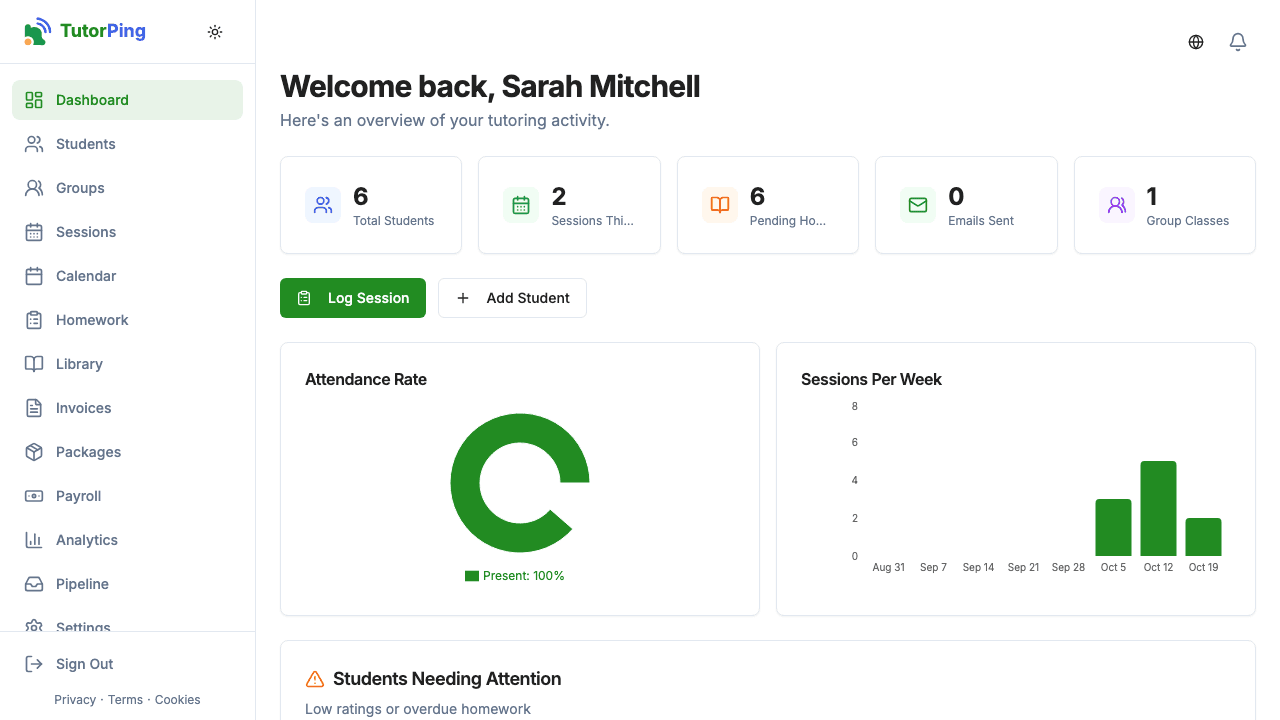
Across the top you'll see five metric cards that give you the big-picture numbers:
Right below the metrics, you'll see your sessions for today and any pending booking requests. If someone's asked to book time with you through your public booking page, the request shows up here so you can propose a time, accept, or reject it. There's also an inquiries banner if you have new inquiries waiting.
The dashboard includes two charts that cover the last 8 weeks: an attendance chart (so you can spot patterns in who's showing up) and a weekly sessions chart (so you can see if your workload is trending up or down). Nothing fancy — just enough to see what's been going on.
Below the charts, you'll find your upcoming sessions with student names and times. Click any session to see the details or log notes after it's done. If you use recurring schedules, future sessions show up here automatically.
This is one of the most useful parts of the dashboard. It flags students who might be struggling — specifically, anyone with a low progress rating (2 or below) or overdue homework. Instead of manually checking every student, you get a heads-up right here.
A quick list of your most recent sessions so you can see what you've been up to and jump back into any session if you need to add notes or make changes.
Pro tip